This solution is only available to Massachusetts-licensed suppliers and municipal aggregators.
Suppliers and municipal aggregators (“Suppliers”) need timely access to their customers' interval data for a variety of use cases including bill verification, analytics, and customer experience.
As a part of their Massachusetts smart meter deployments, some utilities are offering a Bulk Data Exchange solution, powered by UtilityAPI, to deliver post-validation, estimation, and editing (VEE) revenue-quality 15-minute or 5-minute interval data for all of a supplier's customers with AMI meters on a daily basis, within 48 hours of processing. Interval data fields, example API response, and change events handling are detailed below.
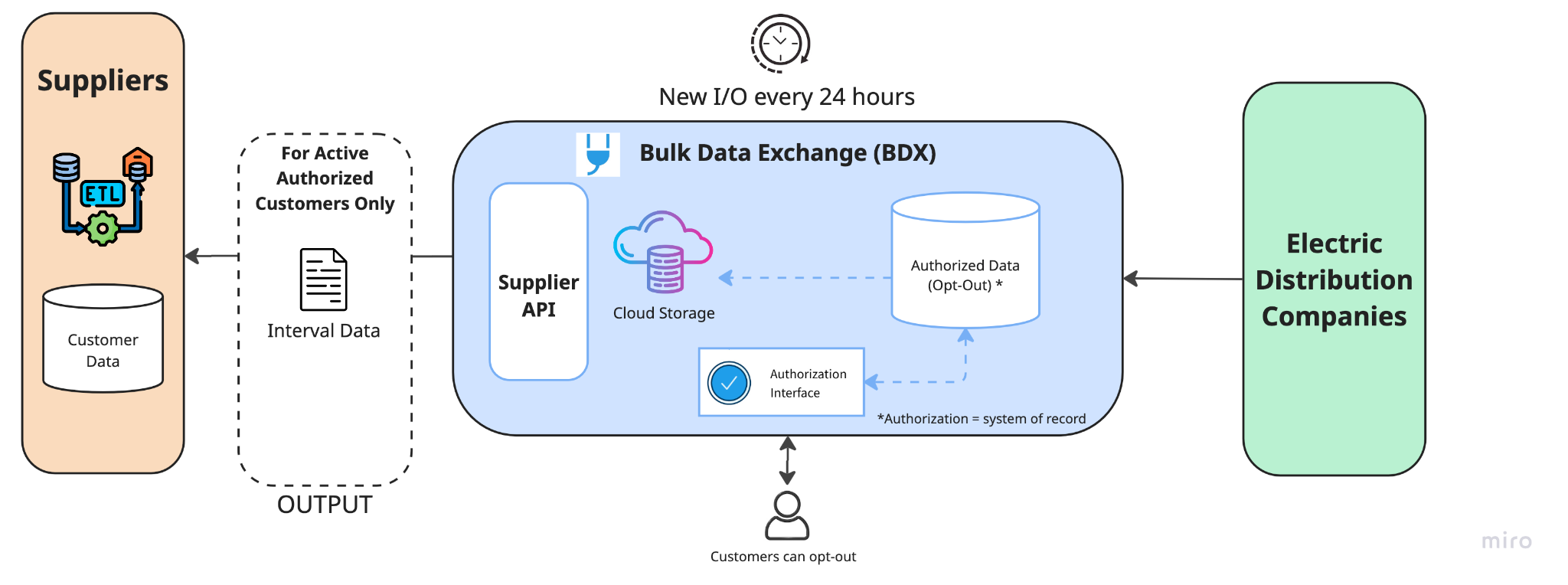
Suppliers' Electronic Data Interchange (EDI) transactions and this Bulk Data Exchange (BDX) solution are complementary. Suppliers should expect to continue to receive their customers' account and billing summaries data from their existing EDI integrations.
This solution (BDX) will deliver interval data for suppliers' current customers where the supplier is the supplier of record for a given Electric Distribution Company's (EDC) accountID in the respective EDC's system. Interval data sharing is opt-out, meaning that a customer's interval data will be shared with an approved supplier unless the customer explicitly opts out of, or revokes, their interval data sharing authorization with their supplier. See “Customer opts out of interval data sharing via utility's Data Sharing Portal” below.
The following events impact a customer's interval data sharing with a supplier, similar to existing EDI processes.
| Change Event | Change Event Type | Implication |
|---|---|---|
| Customer move-out of utilities' MA territory | Customer-level |
All of an accountID's service points' authorizations will expire, ceasing interval data sharing, upon the account's status change from active to inactive within utility data files. Outcome: Supplier will no longer receive data for this account ID's service points. |
| Customer switches to new supplier | Supplier-level |
All of the accountID's service points' authorizations will expire with the existing supplier as of the account's effective supplier switch date. All of the accountID's service points' authorizations will be created with the new supplier as of the account's effective start date with their new supplier. The new supplier will receive up to 24 months of interval readings for all the accountID's service points. Outcome: Supplier will begin to receive data for this account ID's service points. |
| Customer switches to basic service | Supplier-level |
Similar to when a “Customer switches to new supplier” with the exception that the new supplier is the default Electric Distribution Company (EDC) who will provide electricity supply and delivery. Outcome: Supplier will no longer receive data for this account ID's service points. |
| Customer opts out of interval data sharing via utility's Data Sharing Portal (hosted by UtilityAPI) | Customer opt-out |
A customer will have the ability to opt-out of interval data sharing with their existing supplier through the EDC's portal. If the customer opts-out, all of the account's service points' authorizations will be revoked, ceasing interval data sharing effectively immediately (the revocation date). This opt-out will not transfer in the case of the customer switching suppliers. It will not impact customer data shared through the EDCs EDI processes, only interval data shared through this solution. Outcome: Supplier will no longer receive data for this account ID's service points. |
| Smart meter upgrades | Customer-level |
If a supplier is not receiving an accountID's service point's interval data, and none of the above events have occurred, the given service point does not have an upgraded AMI meter. Therefore, 5 or 15 minute interval readings are not being generated for that service point. When a smart meter is installed and begins generating interval readings, the solution will begin sharing the authorized service point's interval data. Outcome: Supplier will begin to receive data for this account ID's service points. |
You must have a UtilityAPI account in order to use this solution. While you only need one UtilityAPI account, you must register with each EDC you want your customers' interval data for.
Below is a summary of the UtilityAPI account creation and EDC registration experience.
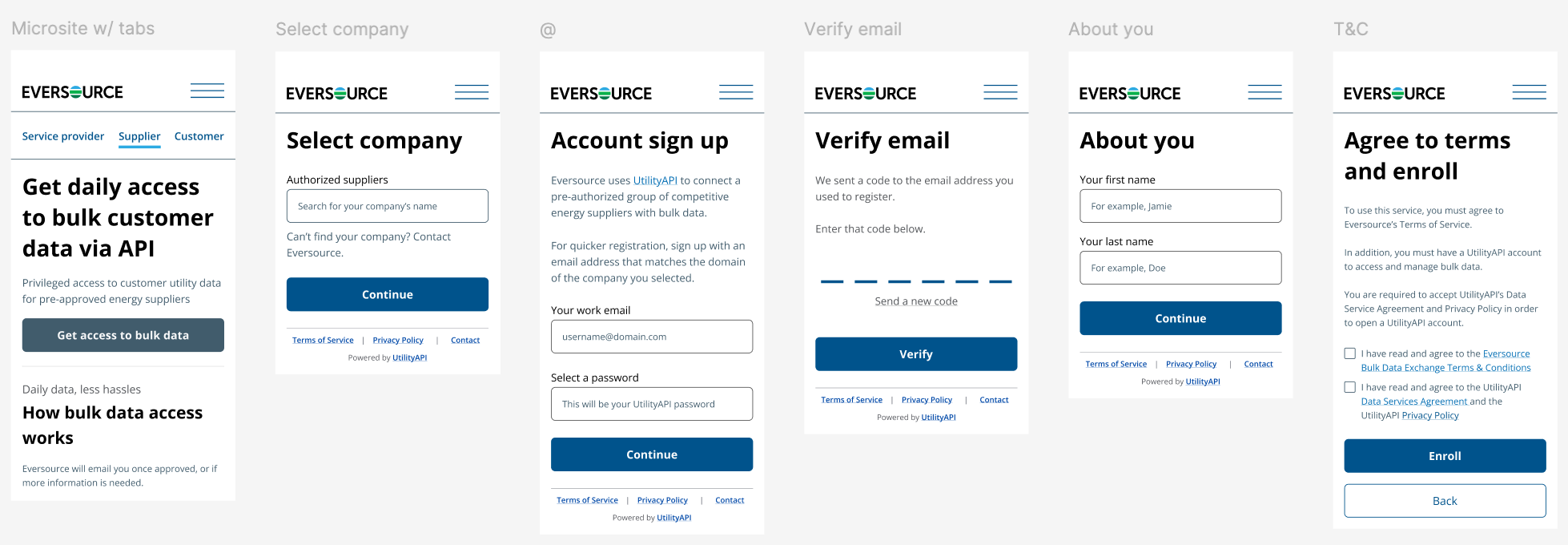
Once you've successfully submitted your enrollment for access, you will be redirected to this API documentation where you can begin developing your API integration using the API Reference and its mock data.
At this time, your registration will be pending approval by the EDC. You can create API tokens, however, it will not allow you access to any of your customer data until the EDC updates your registration status to “Approved”. You can check the status of your registration in settings.
In order to approve your registration, the EDC will verify that the registering user is a valid employee or representative of the approved and licensed supplier selected from the dropdown during the registration process. If for any reason the EDC is unable to approve your registration, it will send you an email to the email address associated with your registration describing the issue.
You can view and manage your registration status. You will receive an email notification once your registration has been reviewed by the EDC.
Once your registration is approved, your API token will grant you access to the API where you can retrieve your customers' daily interval files.
Upon approval, the next day's set of files will be available and subsequent days' files will be generated each day forward as long as your registration remains in good standing.
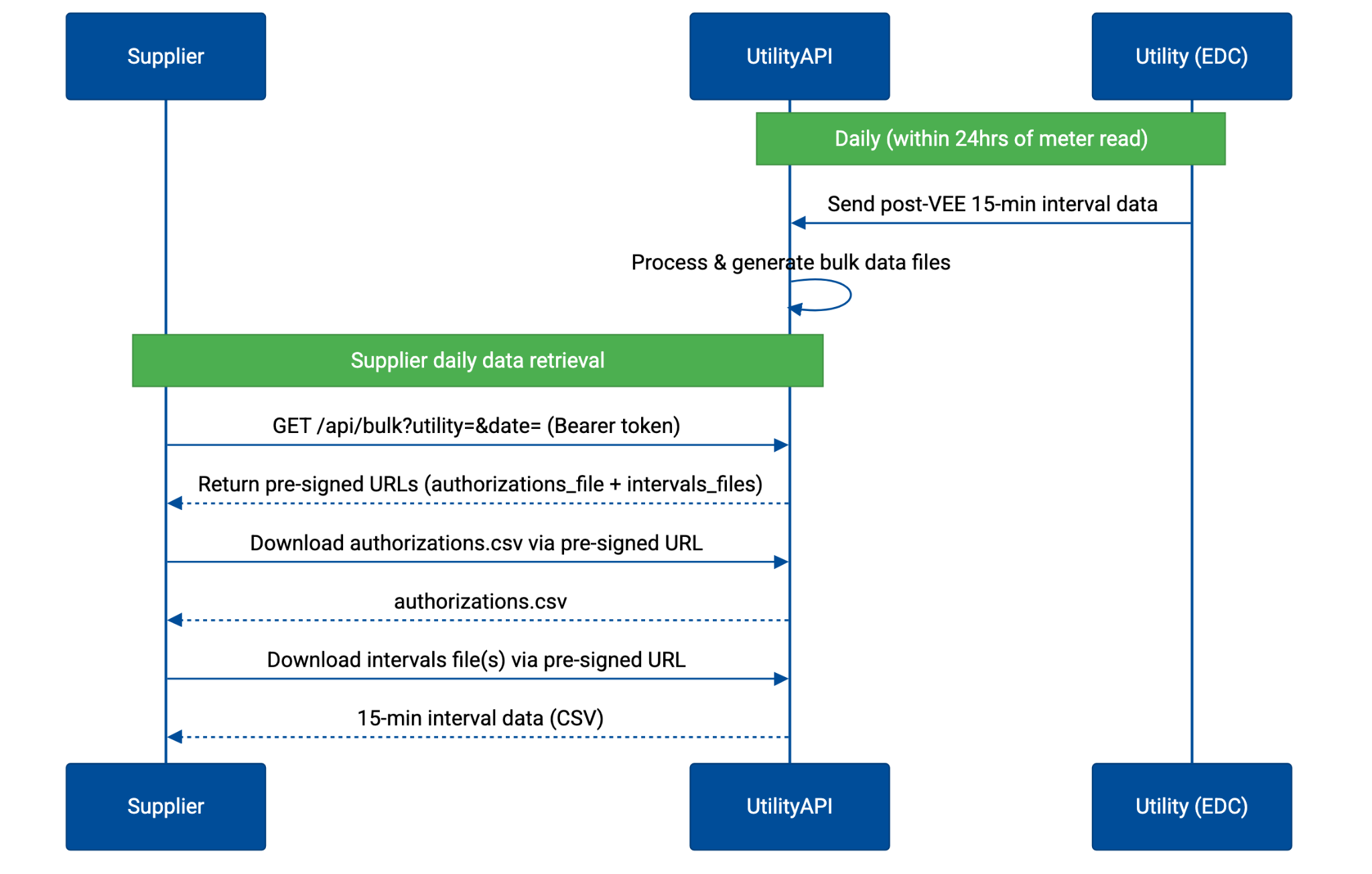
All endpoints require an API token. You must include the API token in the Authorization header using the Bearer format. You can generate an API token in your user settings in the UtilityAPI Dashboard.
/api/v3/suppliers/files
Returns download links for bulk data files for a given utility and date.
| Parameter | Required? | Type | Format | Description | Example |
|---|---|---|---|---|---|
| utility | yes | enum (string) | One of the supported `Utility` | Must be one of:
|
"EVRSRCMA" |
| process_date | yes | string | YYYY-MM-DD | Must be within the availability window. See Retention Period | "2025-12-15" |
Content Type: application/json
Properties:
| Property | Type | Format | Description |
|---|---|---|---|
| supplier_id | string | Unique ID of the requesting supplier | |
| date | string | YYYY-MM-DD | |
| utility | enum (string) | One of the supported `Utility` | |
| authorizations_file | JSON object |
{ "type": "authorizations", "url": "string", "expires_at": "ISO 8601 string" } |
Pre-signed links to download files, valid for a limited time. See Lifespan of Pre-signed URLs |
| intervals_files | JSON array of objects |
[ { "type": "string", "url": "string", "expires_at": "ISO 8601 string" } ... ] |
Pre-signed links to download files, valid for a limited time. See Lifespan of Pre-signed URLs
Interval file types are: |
Example request:
curl -H 'Authorization: Bearer API_TOKEN_HERE' \
    "https://utilityapi.com/api/v3/suppliers/files?utility=EVRSRCMA&process_date=2025-12-15"
Example response:
{
    "supplier_id": "Supplier 1234",
    "date": "2025-12-15",
    "utility": "EVRSRCMA",
    "authorizations_file": {
        "type": "authorizations",
        "url": "{presigned_url}",
        "expires_at": "2025-12-15T00:15:00Z"
    },
    "intervals_files": [
        {
            "type": "daily_intervals",
            "url": "{presigned_url}",
            "expires_at": "2025-12-15T00:15:00Z",
        },
        {
            "type": "historical_intervals_for_new_auths",
            "url": "{presigned_url}",
            "expires_at": "2025-12-15T00:15:00Z",
        }
    ]
  }
Suppliers will request files through an API on a daily basis. There is no graphical user interface (GUI) or front-end. The API's response will include download links to intervals files.
Contains the full set of a supplier's interval data sharing authorizations with their customers as of that day. It maps a supplier's customers' service points to their respective EDC accountIDs and displays the current status of each service point's interval data sharing authorization with the supplier.
If an accountID has multiple service points, there will be a row per service point.
| Field | Description |
|---|---|
supplier_id |
Supplier ID |
account_id |
EDC's account_ID for the customer |
service_point_id |
EDC's service_point_id for the customer |
pod_id |
Point of delivery ID |
created |
Data authorization was created by UtilityAPI. Format: ISO8601. |
is_revoked |
Boolean value of if customer revoked authorization through EDC's customer authorization management interface |
revoked |
Revoked timestamp if true. Format: ISO8601. |
is_expired |
Boolean value that is set to true when the account no longer has an active agreement with the supplier:
If set to true, the accountID's service points' interval data is no longer available via the authorization If expires is a future date, is_expired is false until that date is reached. |
expires |
Timestamp of when the authorization:
An authorization expires when an account:
|
The last 24 hours worth of intervals will be presented along their associated service points i.e. each interval file will contain data for multiple service points.
Interval data for each day may be split across multiple CSV files to limit overall file size.
If applicable for any given day, any newly enrolled customers' historical intervals will also be shared, including up to 24 months of interval data or however much is available.
| Field | Description | Example |
|---|---|---|
account_id |
EDC's account_ID for the customer Type: VARCHAR. |
9999 |
service_point_id |
Utility's unique identifier for the service point. A service point identifies an unchanging device location where service is delivered Type: VARCHAR. |
12345 |
usage_value |
Usage value amount based on meter read in units determined by meter's units. Include three decimal places or higher for watt-level data Type: Number. |
0.456 |
date |
End date of meter read interval. Type: VARCHAR (yyyyMMdd). |
20251213 |
time |
Time representation in 24-hour format in the local time zone. The timestamp represents the end of the read, not the beginning of the read. The following time intervals are supported: 15 minute Type: VARCHAR (HHmm). |
0015 |
units |
Unit of measurement for the usage value, to include power factor Examples of supported values include:
Type: VARCHAR. |
KWH |
is_estimate |
A flag to indicate whether the usage read is estimated or not. Supported Values:
Type: VARCHAR. |
A |
UTC_offest |
The offset from UTC time for the service_point_id in +/-HHmm format. For example, -0800 for a service_point_id that is 8 hours and 0 minutes behind UTC, or +0100 for a service_point_id that is one hour and 0 minutes ahead of UTC. Type: VARCHAR. |
-0400 |
service_type |
The service type provided by service points of this type. Allowed values:
Type: VARCHAR. |
E |
service_quantity_identifier |
An identifier for distinguishing between measured quantities that have identical unit of measure (UOM) combinations. Allowed values:
Type: VARCHAR. |
NET_USAGE |
Data download links for a given date will typically become available within 72 hours of meter reads, to allow for VEE and processing. For example, December 14th's data will be ready on December 17th at the latest. We will generally be attempting to make the data available much earlier than that.
Prior to the readiness of data, the endpoint will return HTTP code 202 indicating that the user should wait and try again later.
Requestors are expected to implement scheduling, or polling, for their daily API calls. It's recommended that suppliers request daily interval files at 4:00 UTC. If the data is not yet ready, implement exponential backoff to gracefully handle retry events by increasing the wait time exponentially (e.g., 5 minutes, 15m, 30m, 1hr) to ensure a day's data is collected.
File download links will remain valid until the expiry time returned in the same endpoint response. The time for which a download link will remain valid is approximately 15 minutes. After expiry, the user may make another request to receive new download links.
The endpoint will accept date parameters that are within the past 30 days. After 30 days, download links for the out of range date will no longer be available and the endpoint will return HTTP code 400.
CSV files will be encoded in UTF-8 and will have comma delimitters.
Suppliers should read files in the order that they appear in the endpoint response. When files are read in this order, rows will be in ascending (service_point_id, date, time) order.
When there is more than one row with the same (service_point_id, date, time), the one that appears latest should be kept; hence why reading the files in order is important. This includes scenarios where the reading is estimated and is updating over time.
Take for example the following truncated interval files received on December 14th:
| account_id | service_point_id | usage_value | date | time | units | is_estimate | UTC_offest | service_type | service_quantity_identifier |
|---|---|---|---|---|---|---|---|---|---|
| 9999 | s123 | 50.234 | 20251213 | 2245 | KWH | A | -0400 | E | NET_USAGE |
| 9999 | s123 | 1.111 | 20251213 | 2245 | KWH | A | -0400 | E | NET_USAGE |
| 9999 | s123 | 1.054 | 20251213 | 2300 | KWH | A | -0400 | E | NET_USAGE |
| 9999 | s123 | 1.109 | 20251213 | 2315 | KWH | E | -0400 | E | NET_USAGE |
| 9999 | s123 | 1.396 | 20251213 | 2330 | KWH | E | -0400 | E | NET_USAGE |
| 9999 | s123 | 1.511 | 20251213 | 2345 | KWH | E | -0400 | E | NET_USAGE |
| account_id | service_point_id | usage_value | date | time | units | is_estimate | UTC_offest | service_type | service_quantity_identifier |
|---|---|---|---|---|---|---|---|---|---|
| 9999 | s123 | 1.522 | 20251214 | 0000 | KWH | E | -0400 | E | NET_USAGE |
And the following interval files received on December 15th:
| account_id | service_point_id | usage_value | date | time | units | is_estimate | UTC_offest | service_type | service_quantity_identifier |
|---|---|---|---|---|---|---|---|---|---|
| 9999 | s123 | 1.234 | 20251213 | 2315 | KWH | A | -0400 | E | NET_USAGE |
| 9999 | s123 | 1.266 | 20251213 | 2330 | KWH | A | -0400 | E | NET_USAGE |
| 9999 | s123 | 1.370 | 20251213 | 2345 | KWH | A | -0400 | E | NET_USAGE |
| 9999 | s123 | 1.458 | 20251214 | 0000 | KWH | A | -0400 | E | NET_USAGE |
| 9999 | s123 | 1.529 | 20251214 | 0015 | KWH | A | -0400 | E | NET_USAGE |
| 9999 | s123 | 1.589 | 20251214 | 0030 | KWH | A | -0400 | E | NET_USAGE |
The files should be ingested in this order:
And the reading for this service point should be understood as:
| account_id | service_point_id | usage_value | date | time | units | is_estimate | UTC_offest | service_type | service_quantity_identifier |
|---|---|---|---|---|---|---|---|---|---|
| 9999 | s123 | 1.111 | 20251213 | 2245 | KWH | A | -0400 | E | NET_USAGE |
| 9999 | s123 | 1.054 | 20251213 | 2300 | KWH | A | -0400 | E | NET_USAGE |
| 9999 | s123 | 1.234 | 20251213 | 2315 | KWH | A | -0400 | E | NET_USAGE |
| 9999 | s123 | 1.266 | 20251213 | 2330 | KWH | A | -0400 | E | NET_USAGE |
| 9999 | s123 | 1.370 | 20251213 | 2345 | KWH | A | -0400 | E | NET_USAGE |
| 9999 | s123 | 1.458 | 20251214 | 0000 | KWH | A | -0400 | E | NET_USAGE |
| 9999 | s123 | 1.529 | 20251214 | 0015 | KWH | A | -0400 | E | NET_USAGE |
| 9999 | s123 | 1.589 | 20251214 | 0030 | KWH | A | -0400 | E | NET_USAGE |
The Channel Type column is used for distinguishing between measured quantities such as consumption, generation, net usage, etc. These can be ingested separately as multiple channels. Alternatively, if only the net value is desired, rows with Channel Type other than NET_USAGE may be ignored.
Daily interval data is only provided for active and authorized service points. If a customer:
A supplier company can have many users, or employees, who can use the solution. Each user can generate API tokens to be used to access data. Each set of API credentials point to the same supplier company's dataset; there is not a unique dataset per user.
For every registered supplier, all associated DUNS+4 accounts will be available to the supplier. Each registered and approved user from a supplier has access to all of that suppliers' authorized customer accounts. Authorizations are scoped to an entire account, so if an applicable change event occurs (such as a customer discontinuing their relationship with a supplier), availability of data for all service points in that account will change accordingly.
Green Button Connect is an opt-in data sharing service for any type of third party to request consent from a utility customer to access their utility account, billing, and interval data. Whereas utility customers must explicitly grant consent, or authorization, to share their data with a select third party with Green Button Connect, this solution utilizes an opt-out model. Because suppliers have received their customers' consent to access their utility data as a prerequisite to providing them with electricity supply, it has been determined that suppliers are entitled to receive these same customers' smart meter data without additional consent. However, similar to Green Button Connect, customers are still in control of their interval data sharing so can manage, or opt-out, of interval data sharing at any time.
For suppliers, Green Button Connect may be viewed as a way to request access to prospective customers' account, billing, and interval data whereas this solution gives you access to your existing customers' interval data only.
National Grid and Eversource have Green Button Connect platforms deployed for their Massachusetts customers. Both are powered by UtilityAPI. You can be signed up for this solution and Green Button Connect at the same time. To register for Green Button Connect, click here.
